| Buy from UK |
Buy from DE |
Buy from IT |
Buy from FR |
Buy from ES |
 |
 |
 |
 |
 |
Content
Description
MKS DLC32 motherboard kit, which is an offline engraving master control kit developed for desktop engraving machines. The hardware is equipped with a 32-bit high-speed ESP32 module, integrated WIFI function, and directly drives a 3.5-inch touch color screen; it can realize fast engraving and WEB web pages. Control, mobile phone APP control and other functions. MKS DLC32 can also be used with the LaserGRBL and LightBurn PC software.
Specification
| ITEMS |
MKS DLC32 |
| MCU |
ESP32-WROOM-32U( 32bits) |
| MCU Freq. |
240MHz |
| FLASH |
8192KBytes |
| RAM |
520KBytes |
| Power Input |
DC12v/24v |
| Laser Speed |
<=8000mm/min |
| PC engraving |
Support |
| Offline Mode |
Support |
| LCD |
Support,3.5 inch Touch TFT |
| WiFi On Board |
Support |
| Web Control |
Support |
| Mobile APP Control |
Support |
| LaserGRBL |
Support |
| LightBurn |
Support |
Interface
DLC32 wiring manual: https://osoyoo.com/picture/2021007600/wiring.pdf
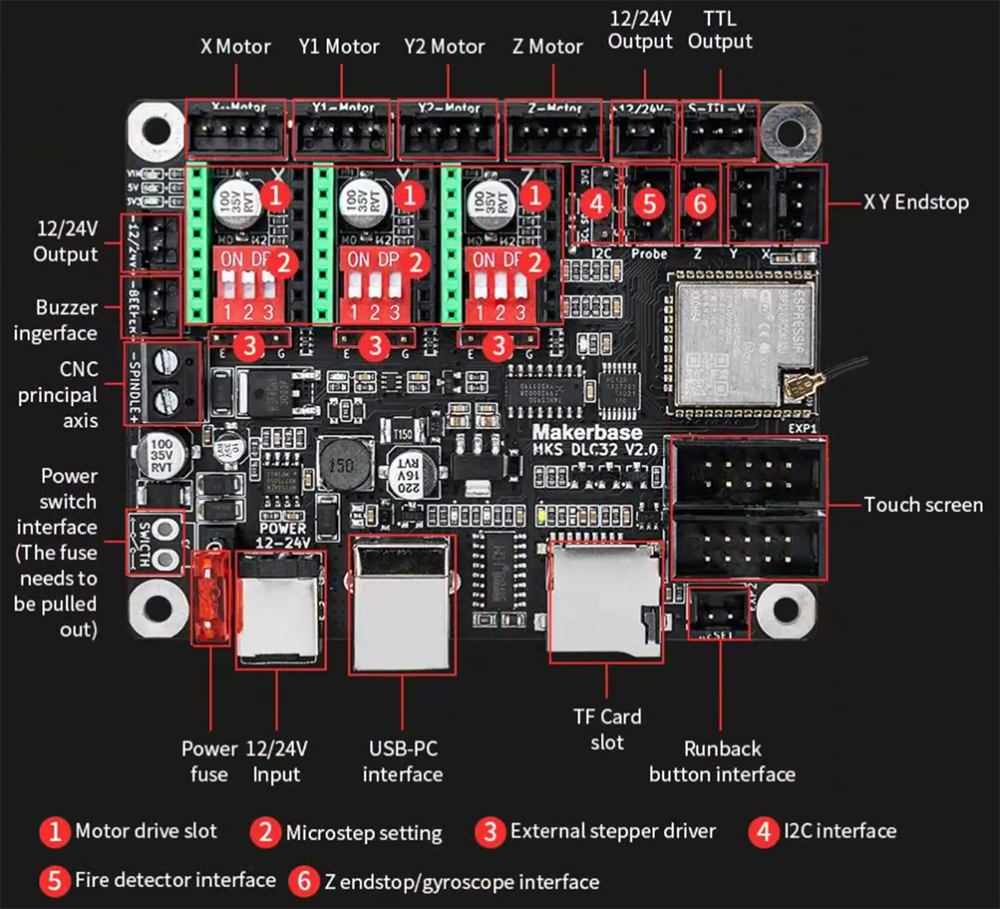
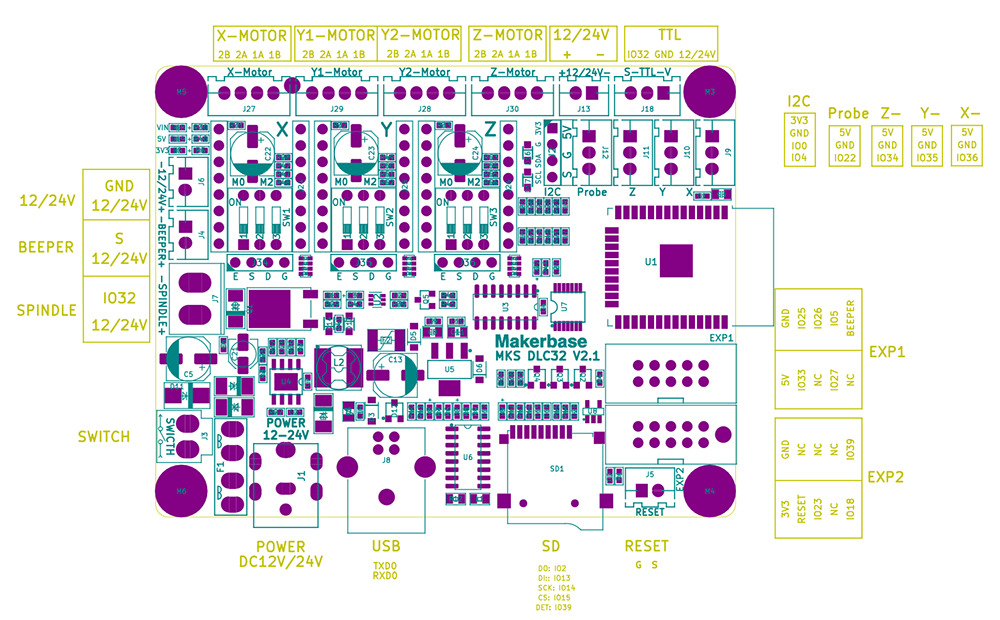
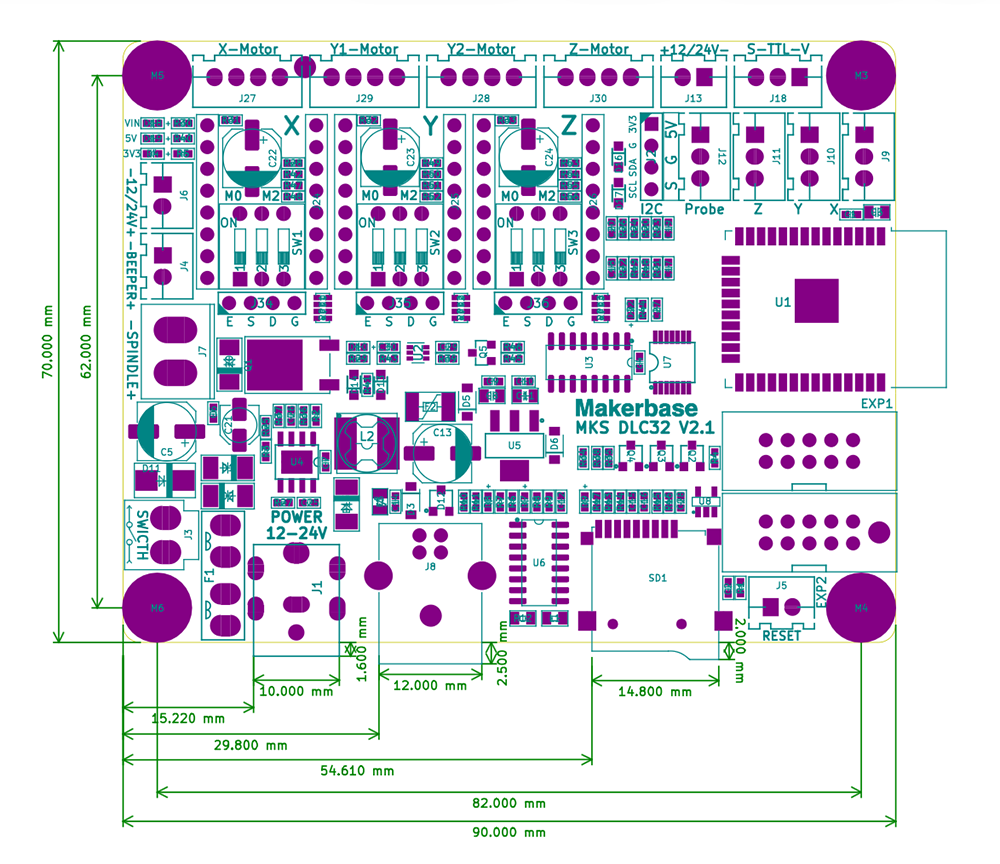
Install firmwares
There are several compiled firmwares that can be downloaded here:
For TS35, Laser, normal machine
For TS35, Laser, CoreXY machine
For TS35, CNC, normal machine
For TS24, Laser, normal machine
For TS24, Laser, CoreXY machine
For TS24, CNC, normal machine
Please note what is your board version and choose the correct one.
The firmware of MKS DLC32 has been burned with laser normal machine before leaving the factory. You can also update the firmware yourself.
Source Code
https://github.com/makerbase-mks/MKS-DLC32-FIRMWARE
Method of upload Firmware
You can either use the “MKS ESP32 Download Tool” or “Flash Download Tools” upload firmware of MKS DLC32.
MKS ESP32 Download Tool(Recommended)
MKS ESP32 Download Tool is specially developed by MKS to simplify the uploading operation. It is recommended to use. For detailed usage, please refer to: https://osoyoo.com/picture/2021007600/firmware.pdf
Flash Download Tools
Windows
- On Windows PC, download the “Flash Download Tools” from https://www.espressif.com/en/support/download/other-tools
- Open the “Flash Download Tools”, choose “Developer Mode”->ESP32 DowloadTool, and it will open the main menu.
- Config the Flash Download Tools
3.1 Choose the firmware(binary file listed above) and fill the address to be 0
3.2 Config the spiFlash
SPI speed: 40MHz
SPI MODE: DOUT
Flash Size: 32Mbit
3.3 Connect MKS DLC32 to PC using the USB line. Choose the COM of the DLC32, if you can’t find the COM, please check if the CH340 driver has been installed on the PC.
3.4 Choose the baudrate which can be over 115200(The greater the baud rate, the faster the transmission speed, but the greater the chance of transmission errors).
3.5 Press START and it will start to upload, just wait it to be finished.

Linux
- Provide valid path to port/firmware and burn the ESP32 chip
esptool.py --baud 300000 --chip esp32 --port /dev/ttyUSB0 write_flash --flash_mode dio --flash_size detect 0x0 TS35/Laser/Normal/Board_V2.0/V2.0.4_H35_20211123_N.bin
Basic configration
When you want to use MKS DLC32 to install to a new machine, you generally need to configure parameters to fit your engraving machine. There are two ways to configure parameters, one is to configure through the configration file, and the other is to configure through the PC software.
Configure through configuration files
- Download the configuration file “dlc_cfg.txt” from MKS GITHUB: https://github.com/makerbase-mks/MKS-DLC32/tree/main/firmware
- Modify the corresponding configuration items according to your engraving machine needs. For specific parameters configrations you can refer to Parameters configuration
- Save “dlc_cfg.txt” and copy to TF card.
- Insert the TF card to DLC32 motherboard, restart it, and it will be automatically configured.
Configure through PC software
- Use a USB cable to connect the DLC32 to the PC
- Open the LaserGRBL software or LightBurn or other serial tools on the PC (the default baud rate is 115200)
- Modify the configuration items. For specific configuration commands, please refer to Parameters configuration
Parameters configuration
You can use PC software such as GRBLaser to config the parameters by sending commands, here is the list:
| COMMANDS |
PARAMETERS |
DESCRIPTION |
| $0 |
10 |
Sets time length per step. Minimum 3usec. |
| $1 |
5 |
Sets a short hold delay when stopping to let dynamics settle before disabling steppers. Value 255 keeps motors enabled with no delay. |
| $2 |
0 |
Inverts the step signal. Set axis bit to invert (00000ZYX). The details can refer to XYZ-TABLE |
| $3 |
1 |
Inverts the direction signal. Set axis bit to invert (00000ZYX). The details can refer to XYZ-TABLE |
| $4 |
0 |
Inverts the stepper driver enable pin signal. |
| $5 |
1 |
Inverts the all of the limit input pins. |
| $6 |
0 |
Inverts the probe input pin signal. |
| $10 |
1 |
Alters data included in status reports. |
| $11 |
0.01 |
Sets how fast Grbl travels through consecutive motions. Lower value slows it down. |
| $12 |
0.002 |
Sets the G2 and G3 arc tracing accuracy based on radial error. Beware: A very small value may effect performance. |
| $13 |
0 |
Enables inch units when returning any position and rate value that is not a settings value. |
| $20 |
0 |
Enables soft limits checks within machine travel and sets alarm when exceeded. Requires homing. |
| $21 |
0 |
Enables hard limits. Immediately halts motion and throws an alarm when switch is triggered. |
| $22 |
0 |
Enables homing cycle. Requires limit switches on all axes. |
| $23 |
0 |
Homing searches for a switch in the positive direction. Set axis bit (00000ZYX) to search in negative direction. The details can refer to XYZ-TABLE |
| $24 |
300 |
Feed rate to slowly engage limit switch to determine its location accurately. |
| $25 |
1000 |
Seek rate to quickly find the limit switch before the slower locating phase. |
| $26 |
250 |
Sets a short delay between phases of homing cycle to let a switch debounce. |
| $27 |
1 |
Retract distance after triggering switch to disengage it. Homing will fail if switch isn’t cleared. |
| $28 |
1000 |
Modify the output frequency of the spindle, the input range is 0-100000 |
| $30 |
1000 |
Maximum spindle speed. Sets PWM to 100% duty cycle. |
| $31 |
0 |
Minimum spindle speed. Sets PWM to 0.4% or lowest duty cycle. |
| $32 |
1 |
Enables laser mode. Consecutive G1/2/3 commands will not halt when spindle speed is changed. |
| $100 |
80 |
X-axis travel resolution in steps per millimeter. |
| $101 |
80 |
Y-axis travel resolution in steps per millimeter. |
| $102 |
80 |
Z-axis travel resolution in steps per millimeter. |
| $110 |
6000 |
X-axis maximum rate. Used as G0 rapid rate. |
| $111 |
6000 |
Y-axis maximum rate. Used as G0 rapid rate. |
| $112 |
6000 |
Z-axis maximum rate. Used as G0 rapid rate. |
| $120 |
500 |
X-axis acceleration. Used for motion planning to not exceed motor torque and lose steps. |
| $121 |
500 |
Y-axis acceleration. Used for motion planning to not exceed motor torque and lose steps. |
| $122 |
500 |
Z-axis acceleration. Used for motion planning to not exceed motor torque and lose steps. |
| $130 |
285 |
Maximum X-axis travel distance from homing switch. Determines valid machine space for soft-limits and homing search distances. |
| $131 |
272 |
Maximum Y-axis travel distance from homing switch. Determines valid machine space for soft-limits and homing search distances. |
| $132 |
80 |
Maximum Z-axis travel distance from homing switch. Determines valid machine space for soft-limits and homing search distances. |
| $Homing/Cycle1 |
0/Z |
$Homing/Cycle1=0 or $Homing/Cycle1=Z |
XYZ TABLE
For the commands of $2/$3/$23, the detailed parameters can be refer to:
| Directions |
Parameters |
| X+ Y+ Z+ |
0 |
| X- Y+ Z+ |
1 |
| X+ Y- Z+ |
2 |
| X- Y- Z+ |
3 |
| X+ Y+ Z- |
4 |
| X- Y+ Z- |
5 |
| X+ Y- Z- |
6 |
| X- Y- Z- |
7 |
Supplementary note:
- About CNC Firmware Z-Homing
- The command to turn on this feature: ($Homing/Cycle1=Z)or($Homing/Cycle0=Z;$Homing/Cycle1=XY)
- The command to turn off this feature: $Homing/Cycle1=0
- About CNC probe
- G38.2 is valid when $6=1
- G38.4 is valid when $6=0



