Osoyoo 3.5″ HDMI Screen – DDC/CI Function Guide
Product: Osoyoo 3.5″ HDMI Touchscreen Display
Feature: DDC/CI Communication Support
Standard: MCCS Version 2.2
Compatible OS: Windows, Linux, Raspberry Pi OS
What is DDC/CI? HDMI35 Display supports DDC/CI communication, and users can adjust various parameters of the display via HDMI I2C (DDC Channel) port.
1Specification
DDC/CI Standard
Monitor Command and Control Set (MCCS) Version 2.2
Supported Commands
| Code |
Description |
| 0x03 |
Set VCP Feature |
| 0x01 |
Get VCP Feature |
| 0xF3 |
Capabilities Request |
| 0x0C |
Save current settings |
VCP Features
| Code |
Function |
Access |
| 0x04 |
Restore factory defaults |
WriteOnly |
| 0x10 |
Adjust Brightness |
ReadWrite |
| 0x12 |
Adjust Contrast |
ReadWrite |
| 0x16 |
Adjust Red Gain |
ReadWrite |
| 0x18 |
Adjust Green Gain |
ReadWrite |
| 0x1A |
Adjust Blue Gain |
ReadWrite |
| 0xB6 |
Get Display type |
ReadOnly |
| 0xD6 |
Set Power mode (Power On/Off) |
ReadWrite |
| 0xDF |
Get VCP Version |
ReadOnly |
| 0xE1, 0xE2, 0xE3 |
Custom features |
Custom |
2System Requirements
- Any kind of OS (Win7/10/11, Debian, Ubuntu, RaspberryOS…) which is capable drive HDMI port’s I2C bus.
- DDC/CI control can be implemented using specific tool (like as ddcutil), or manual programming.
- DDC/CI control is able when the display is in sleep/suspend mode, so can be used for power status control.
3Usage (ddcutil)
There are many of DDC/CI control apps, for example, ddcutil is very convenient and popular tool for Linux users.
For install, config, usage of ddcutil, please reference the documents:
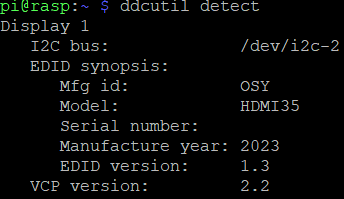
Detect Display
ddcutil detect
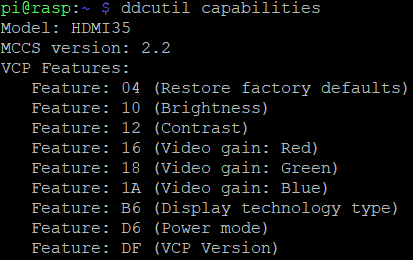
Get Capabilities
ddcutil capabilities
Adjust Brightness
ddcutil setvcp 10 70    # Set brightness to 70 (range: 1~100)
ddcutil getvcp 10       # Get current brightness
Adjust Contrast
ddcutil setvcp 12 80    # Set contrast to 80 (range: 1~100)
ddcutil getvcp 12       # Get current contrast
Adjust Colors
Red:
ddcutil setvcp 16 128   # Set Red gain to 128 (range: 1~255)
ddcutil getvcp 16       # Get Red gain
Green:
ddcutil setvcp 18 128   # Set Green gain to 128 (range: 1~255)
ddcutil getvcp 18       # Get Green gain
Blue:
ddcutil setvcp 1A 128   # Set Blue gain to 128 (range: 1~255)
ddcutil getvcp 1A       # Get Blue gain
Save Current Settings
ddcutil scs # Save settings to EEPROM
Note: Modified contrast, color… values (except brightness) are not saved directly. This command stores the values to the display’s non-volatile storage.
Restore Factory Defaults
ddcutil setvcp 04 01 # Discard all changes, back to factory default
Note: This command is ignored if the value is 00.
Power Status Control
ddcutil setvcp D6 01    # Power ON display
ddcutil setvcp D6 03    # Power OFF / Suspend display
ddcutil getvcp D6       # Get current power status
| Value |
Status |
| 01 |
Normal status |
| 02 |
Standby status (when no input signal, readonly value) |
| 03 |
Suspend status (minimum power consumption) |
Custom Commands
# Logo Control (E1)
ddcutil setvcp E1 1     # Enable logo (default: 1)
ddcutil setvcp E1 0     # Disable logo

# HDMI Note Control (E2)
ddcutil setvcp E2 1     # Enable HDMI note (default: 1)
ddcutil setvcp E2 0     # Disable HDMI note

# Sleep Control (E3)
ddcutil setvcp E3 1     # Enable sleep when no signal (default: 0)
ddcutil setvcp E3 0     # Disable sleep, always shows
For more detailed data transaction protocols, packet structures, please reference: https://www.ddcutil.com/bibliography/
4DDC/CI – Raspberry Pi Issues
Important: HDMI port’s I2C bus is enabled by default in latest RaspberryPi OS KMS driver mode. For using the I2C in FKMS driver mode, it needs extra configuration.
For FKMS mode, you need to add the following to config.txt:
dtparam=i2c2_iknowwhatimdoing
Known Issues:
- It does not work in Raspberry Pi 4, Bullseye, 64bit… and KMS mode is almost essential for running DDC/CI applications.
- The specific, non-standard resolutions (like as 480×320) require FKMS mode, so DDC-CI control is unavailable when using 480×320 resolution in many cases.
5Windows Tools
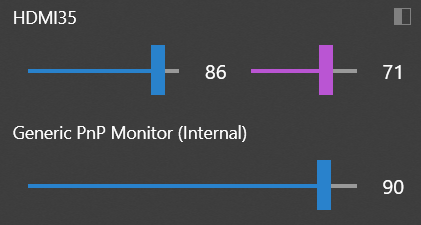
Recommended DDC/CI tools for Windows:
Developer Note: There are also many of C, Python… DDC/CI libraries, resources, and users can develop customized DDC/CI display control app using appropriate libraries.
6Tech Support
Need help or have feedback? Submit a ticket and our team will get back to you within 1-2 working days.
Working Time: 9 AM – 6 PM GMT+8 (Monday – Friday)
Contact Us: [email protected]