
| Buy from US |
Buy from UK |
Buy from DE |
Buy from FR |
Buy from IT |
Buy from ES |
Buy from JP |
 |
 |
 |
 |
 |
 |
 |
The OSOYOO MEGA-IoT Shield is based on the Arduino shield form factor and integrates the famous ESP8266 Wi-Fi chip, providing a low-cost Wi-Fi solution for Arduino MEGA2560 projects.
The OSOYOO MEGA-IoT Shield is a plug-and-play shield that is very convenient for beginners. No additional soldering or wiring is needed — just stack the shield onto the OSOYOO Advanced Board for Mega2560 (fully compatible with Arduino Mega2560), select the pins for serial communication using the mini jumpers, and the hardware connection is complete!
The ESP12S comes pre-flashed with AT-command firmware, so it can be controlled by any UART/Serial interface. It also exposes all of the ESP8266’s I/O for direct command access. The shield is not limited to AT commands — most I/O pins are broken out so you can program the ESP12S module directly. Whether you want to add your own AT commands or flash custom firmware onto the ESP8266, this feature is very useful, especially when using the UART pin selectors.

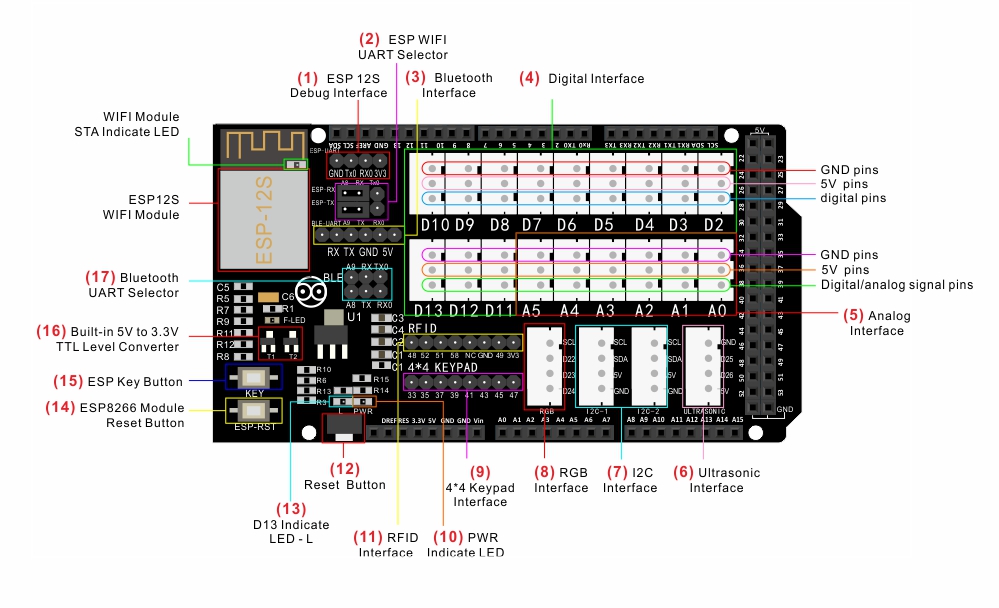
- ESP8266 debug port — these 4 pins can be used to flash ESP8266 firmware or debug AT commands via the serial port.
- ESP Wi-Fi Selector: when the jumper caps are on the left side, the ESP connects to Software Serial (A8, A9); when on the right, the ESP8266 connects to MEGA2560 Hardware Serial1.
- Connector for HC-02 (or HC-05, HC-10) Bluetooth module
- XH2.54 digital module slots for connecting OSOYOO digital modules
- XH2.54 analog module slots for connecting OSOYOO analog modules
- Connector for the OSOYOO Ultrasonic Sensor module
- XH2.54 4-pin slot for connecting I2C devices (e.g., OSOYOO I2C LCD, PCA9685)
- Connector for the OSOYOO RGB module
- Connector for the OSOYOO 4×4 Keypad
- Power indicator LED
- Connector for the OSOYOO RFID module
- Reset button
- LED (D13)
- ESP8266 Reset button (for flashing firmware)
- ESP8266 Boot button (for flashing firmware)
- Built-in 5V-to-3.3V level shifter
- Bluetooth Serial Selector: when the jumper caps are on the left side, Bluetooth connects to Software Serial (A8, A9); when on the right, it connects to MEGA2560 Hardware Serial1.
Notes:
- The standard pin spacing ensures full compatibility with standard-size boards such as Arduino Uno and Mega, but not with smaller boards like Nano and Mini.
- The 3.3 V supply uses an advanced regulator chip (the same as the official ESP12S power chip), so the OSOYOO board provides a more stable 3.3 V rail — the ESP8266 operates exactly as it would with the official chip.
- A dedicated Wi-Fi module power/service interface lets developers extend the power supply and perform maintenance easily.
- The onboard ESP8266-12 is an industrial-grade serial Wi-Fi module with an enhanced PCB antenna for better signal strength.
- The DIP switch lets you quickly toggle the ESP8266-12 Wi-Fi module between operating mode and firmware-upgrade mode; an integrated serial chip makes firmware flashing quick and easy.
- A built-in 5V-to-3.3V TTL level shifter protects the ESP8266 module from high-voltage TTL signals.
- The onboard ESP8266-12 Wi-Fi module features a metal shield for excellent interference immunity.
- All interfaces of the ESP8266-12 are broken out on standard-pitch headers, giving developers easy access for deep integration and customization.
- The stackable design lets you add additional shields or modules on top without any extra wiring.
- Four onboard LEDs display the ESP8266 status: PWR, L, and STA.

- Input Voltage: +5 V DC (internal) / +7 V to +9 V DC (external)
- ESP8266 Module Supply: +3.3 V DC
- Default Baud Rate: 9600 bps, 8 data bits, 1 stop bit, no parity
- Onboard ESP12S Wi-Fi module with preloaded AT firmware
- Jumper selectors for software or hardware UART and PC-to-ESP communication
- Stackable digital I/O header: digital I/O pins stacked onto the OSOYOO MEGA2560 board; additional Arduino shields can be stacked on top
- Stackable analog input header: analog input pins stacked onto the OSOYOO MEGA2560 board; additional Arduino shields can be stacked on top
- Serial Selector: select A8 as the RX pin and A9 as the TX pin on the OSOYOO MEGA2560 board using the mini jumpers





Bonjour pourriez-vous me donner les instructions pour flasher la carte Méga iot sheild v1,1.
Est possible de flasher cette carte avec tasmota et dela faire communique avec domoticz?
Est-il possible d’avoir plus de renseignement sur cette carte car sur internet il n’y a pas grand chose!!!
Bien à vous.
Hola, debería estar más completa la documentación en español, las imágenes no están traducidas, es sólo parcial la traducción!!!
Saludos