| Acquista da OSOYOO |
Acquista negli USA |
Acquista nel UK |
Acquista in DE |
Acquista in IT |
Acquista in FR |
Acquista in ES |
Acquista in JP |
 |
 |
 |
 |
 |
 |
 |
 |
Panoramica
Nota: Il display touchscreen OSOYOO 10,1″ IPS DSI richiede un driver. I driver sono forniti per Raspberry Pi OS e Ubuntu — seleziona il tutorial più adatto al tuo sistema operativo:
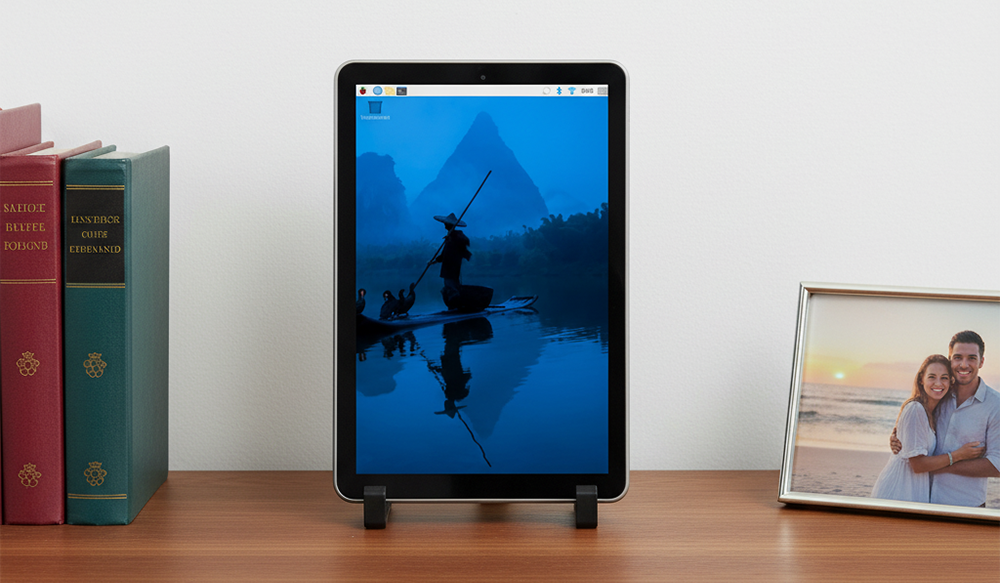
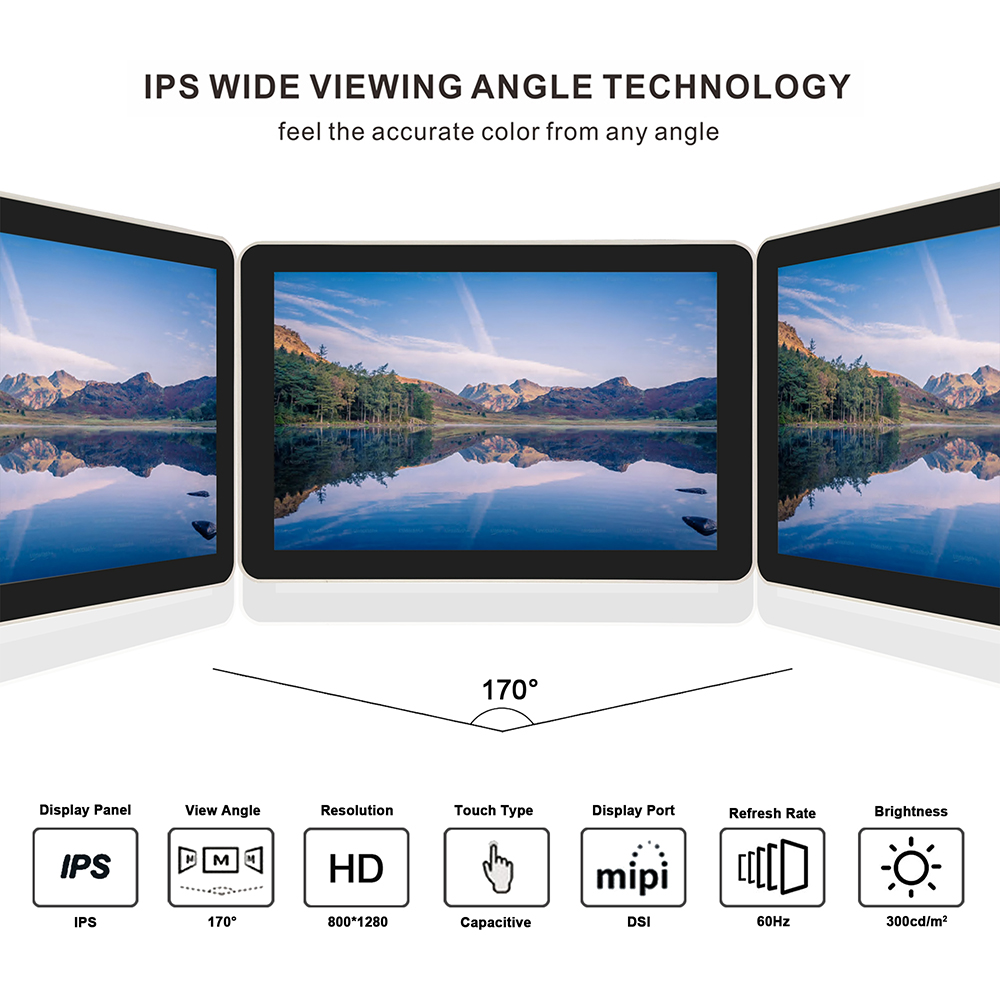
Con il display touchscreen OSOYOO 10,1″ IPS DSI, vivi immagini straordinarie su un vivace schermo IPS 800×1280 con un ampio angolo di visione di 170°, che garantisce colori precisi e costanti da quasi qualsiasi prospettiva. Il robusto pannello in vetro temperato 6H offre un’eccellente resistenza ai graffi e una protezione duratura. Dalla risoluzione nativa HD in verticale — ideale per gli sviluppatori — alla compatibilità con il più recente OS Bookworm, ogni funzione è progettata per migliorare il tuo flusso di lavoro. Il design innovativo all-in-one include una custodia posteriore protettiva e un paio di supporti facili da applicare e rimuovere, creando in pochi secondi una postazione di lavoro ordinata e portatile.
Che tu stia costruendo un server mobile, un tablet personalizzato o una postazione di codice compatta, questo display offre le prestazioni, la flessibilità e la portabilità di cui hai bisogno per dare vita alle tue idee.

Caratteristiche
- Touchscreen DSI da 10,1 pollici
- Pannello display IPS con risoluzione hardware di 800×1280
- Pannello touch capacitivo in vetro temperato con durezza superficiale fino a 6H
- Supporta il pilotaggio diretto del LCD tramite l’interfaccia DSI del Raspberry Pi, con una frequenza di aggiornamento fino a 60 Hz.
- È necessario un driver. L’installazione è semplice e viene supportato solo il più recente sistema Bookworm (Kernel 6.12 e versioni successive, rilasciato il 2025-05-13).
- Compatibile con tutti i Raspberry Pi dotati di interfacce DSI (Raspberry Pi 5/4/3/2)
- CONNESSIONE DSI AD ALTA VELOCITÀ: Goditi un display fluido e a bassa latenza grazie all’interfaccia DSI diretta. Con supporto per configurazioni a 2 e 4 corsie, offre prestazioni superiori e un consumo energetico ridotto rispetto all’HDMI, liberando la porta HDMI del tuo Pi per altri usi.
- DESIGN PORTATILE ALL-IN-ONE: Il monitor OSOYOO 10,1″ IPS DSI trasforma il tuo Raspberry Pi in una workstation elegante e portatile. La custodia posteriore su misura e non rimovibile fissa saldamente il tuo Pi (modelli 2/3/4/5), e il supporto rimovibile senza attrezzi offre stabilità ovunque. La soluzione ideale per un setup mobile e senza ingombri.
Scheda tecnica schermo IPS 10,1″:
https://osoyoo.com/picture/10.1DSI/datasheet.pdf
Specifiche tecniche
| Parametri |
Valore |
Unità |
| Tensione di ingresso |
5,00 |
V |
| Corrente di ingresso |
0,5 |
A |
| Disposizione dei punti |
800(H) x3(RGB)x 1280 (V) |
pixel |
| Modalità di visualizzazione |
IPS(Normal Black) |
— |
| Angolo di visione |
85/85/85/85 (Tutti) |
° |
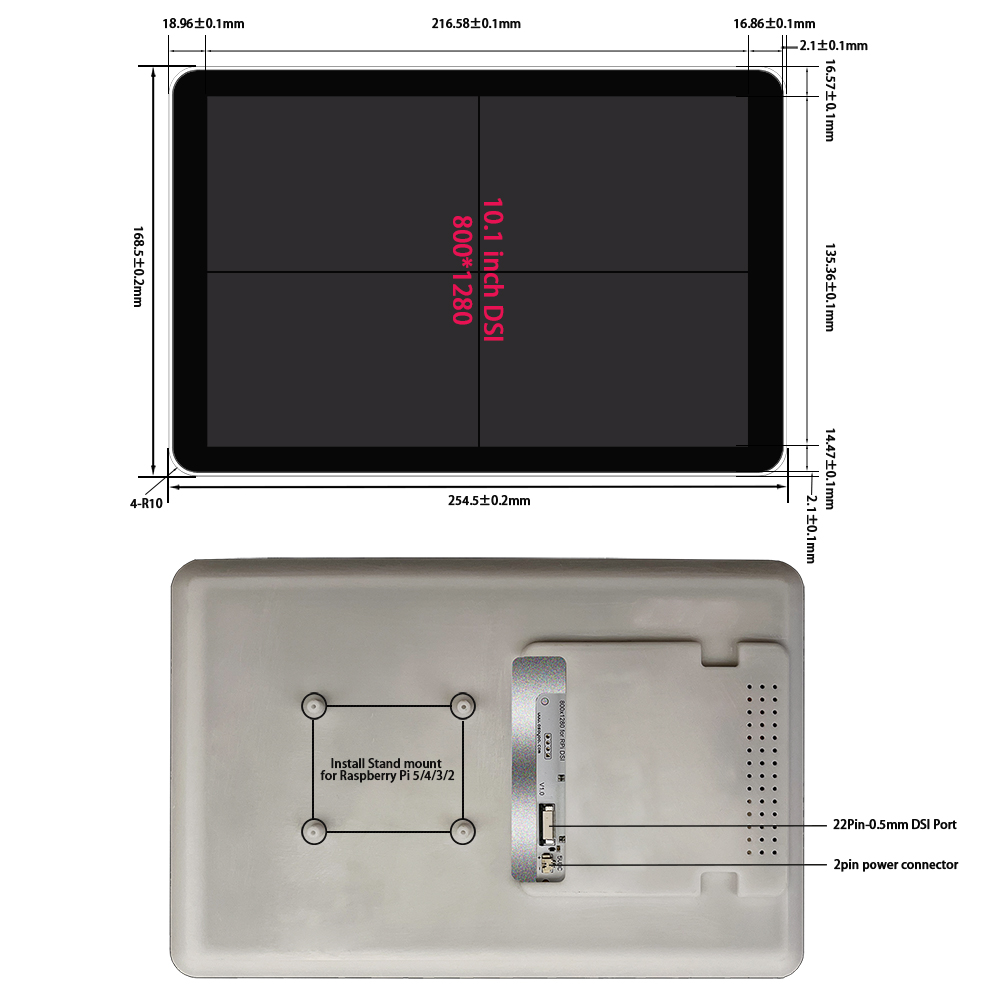
| Dimensioni del modulo |
168,5(H) x 254,5(V) x15,5(D) |
mm |
| Area attiva |
135,36(H) x 216,58 (V) |
mm |
| Interfaccia |
2&4 Lanes MIPI DSI Interface |
— |
| Durezza superficiale |
6H |
— |
| Peso |
525 |
g |
| Luminosità retroilluminazione |
TYP=250 |
nits |
| Tipo LCD |
TFT |
— |
| Tipo di pannello |
G+G |
— |
| Temperatura di esercizio |
0~50 |
℃ |
| Temperatura di stoccaggio |
-10~70 |
℃ |
Nota: Tolleranza non indicata: ±0,20
Contenuto della confezione
Installazione
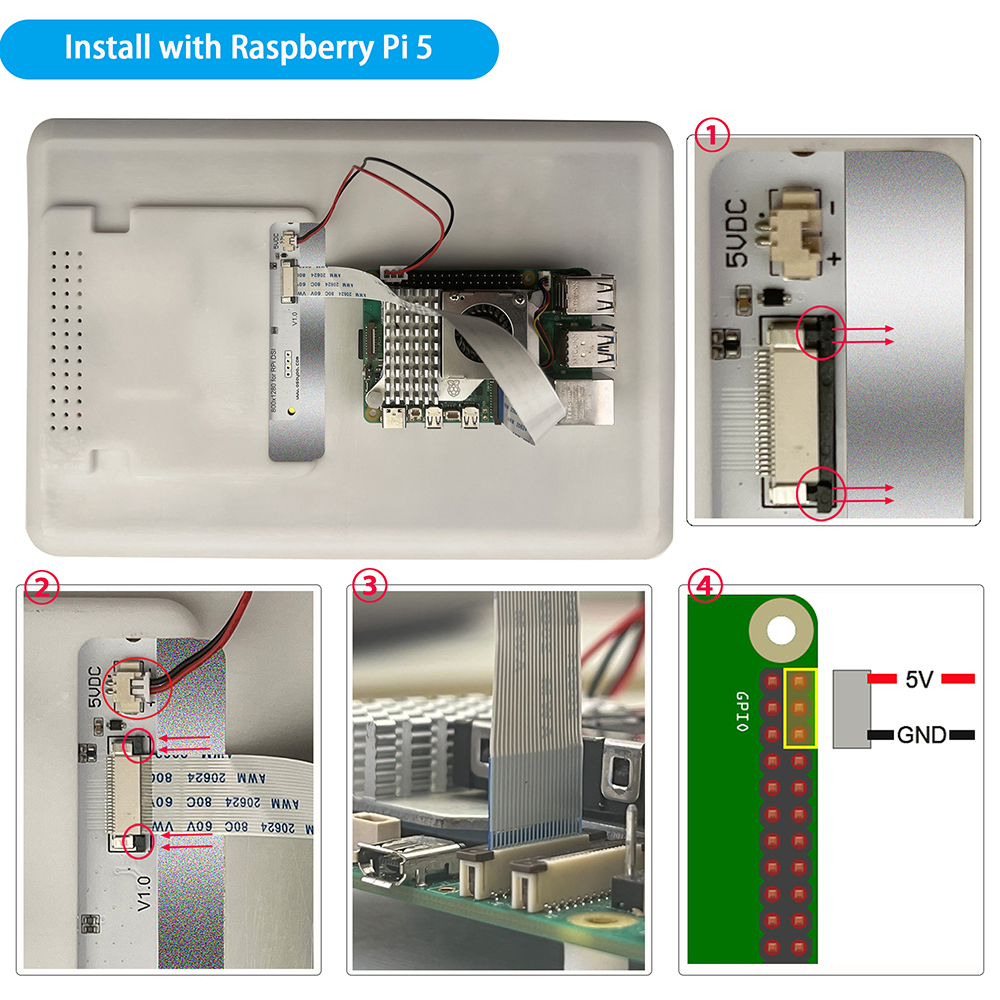
Collegamento hardware con Raspberry Pi 5
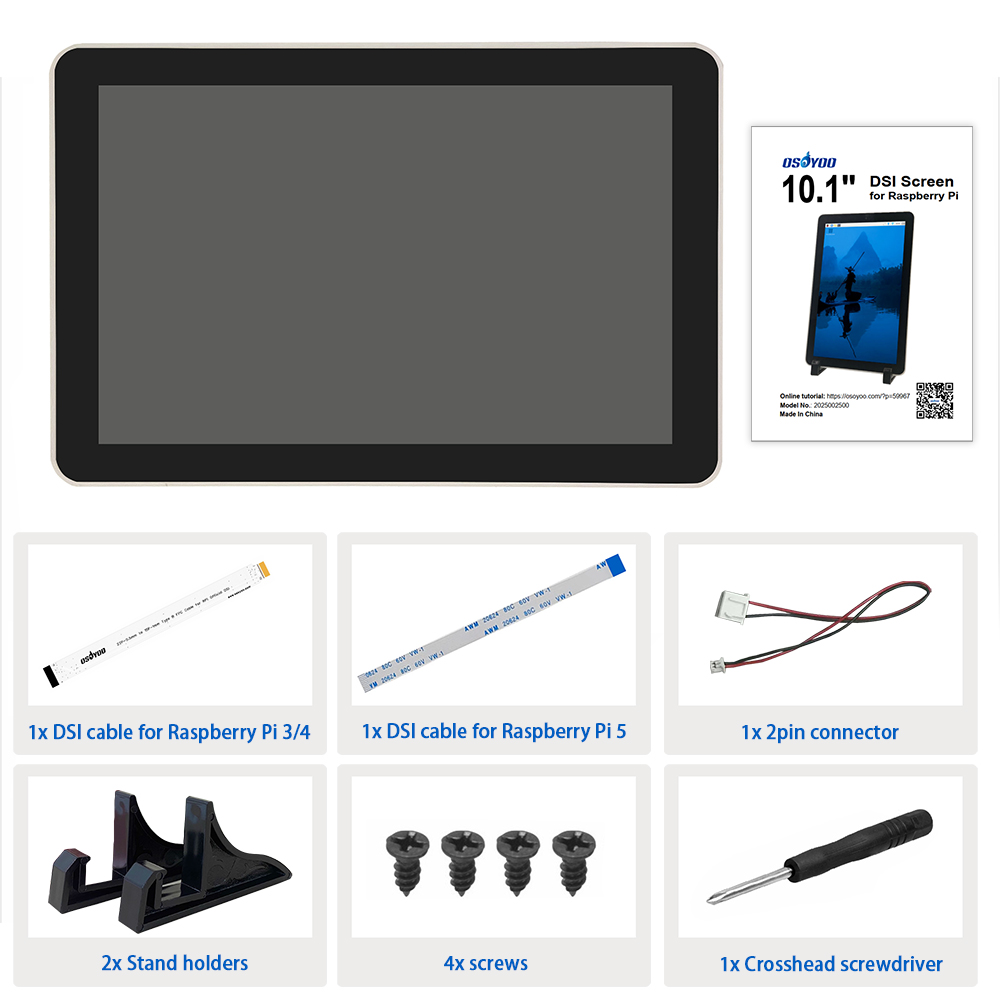
1. Usa il cavo DSI da 22 pin 0,5 mm a 22 pin 0,5 mm (per Pi 5) per collegare la porta DSI del display alla porta DSI a 22 pin della scheda madre Raspberry Pi.
2. Usa il connettore a 2 pin per collegare il connettore di alimentazione del display all’header pin 5V GND della scheda madre Raspberry Pi.
3. Fissa il Raspberry Pi al display con viti M2.5.
Nota: Assicurati che il cavo DSI sia collegato nella direzione corretta e che l’alimentazione 5V sia fornita tramite i pin GPIO.
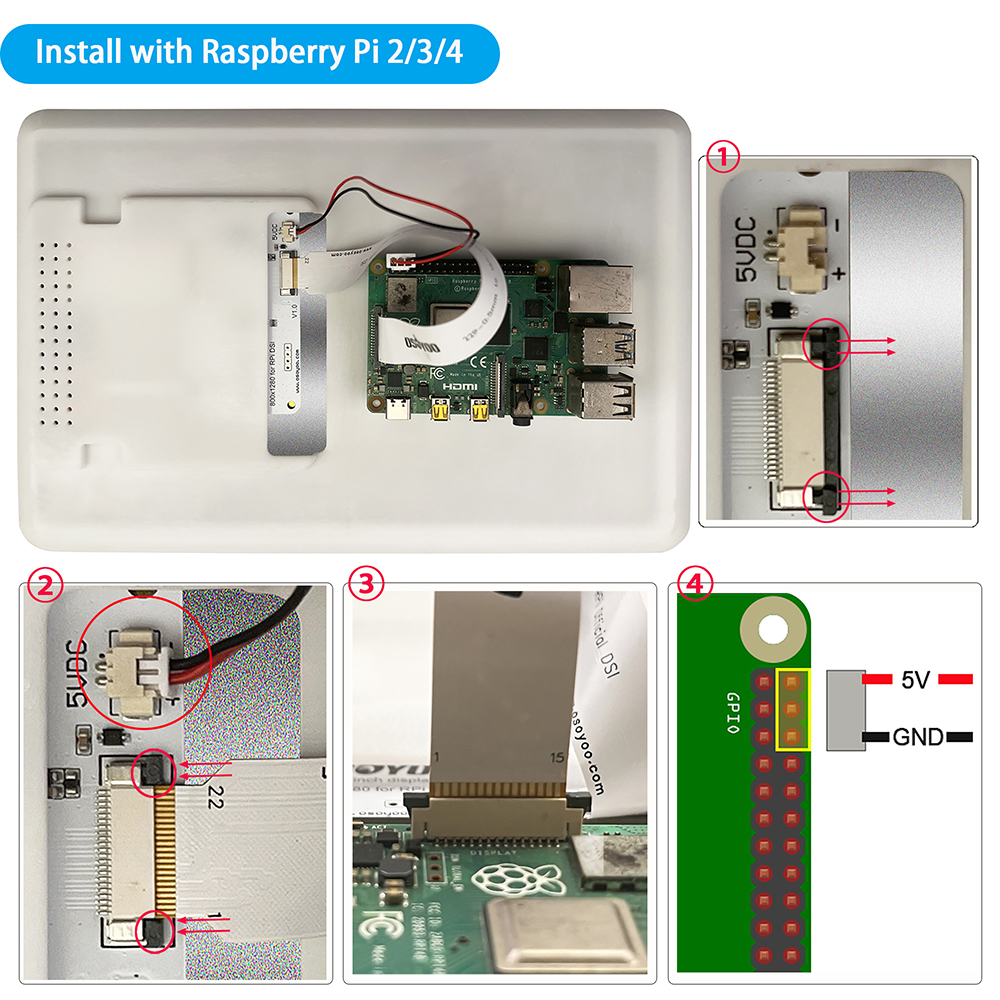
Collegamento hardware con Pi 4B/3B+/3B/3A+
1. Usa il cavo DSI da 15 pin 1 mm a 22 pin 0,5 mm (per Pi 3/4) per collegare la porta DSI del display alla porta DSI a 15 pin della scheda madre Raspberry Pi.
2. Usa il connettore a 2 pin per collegare il connettore di alimentazione del display all’header pin 5V GND della scheda madre Raspberry Pi.
3. Fissa il Raspberry Pi al display con viti M2.5.
Nota: Assicurati che il cavo DSI sia collegato nella direzione corretta e che l’alimentazione 5V sia fornita tramite i pin GPIO.
ISTRUZIONI DI SICUREZZA
Per evitare malfunzionamenti o danni a questo prodotto, si prega di rispettare quanto segue:
• Prima di collegare il dispositivo, spegni il tuo Raspberry Pi e scollegalo dall’alimentazione esterna.
• Tensioni di ingresso superiori al massimo o un utilizzo improprio possono causare danni permanenti al dispositivo.
• La corrente di ingresso deve essere ≥ 0,5 A; in caso contrario, potrebbe causare guasti all’avvio o anomalie del display, e un funzionamento anomalo prolungato potrebbe causare danni permanenti al dispositivo.
• Se il cavo si stacca, tira il meccanismo di blocco verso di te sul connettore, inserisci il cavo piatto con i contatti metallici rivolti verso di te, poi spingi il meccanismo di blocco di nuovo al suo posto.
• Questo dispositivo deve essere utilizzato in un ambiente asciutto a 0–50 °C.
• Non esporlo all’acqua o all’umidità e non appoggiarlo su superfici conduttive durante il funzionamento.
• Non esporlo a calore eccessivo da qualsiasi fonte.
• Fare attenzione a non piegare o sollecitare il cavo piatto.
• Prestare attenzione durante il fissaggio delle viti. Un filetto incrociato può causare danni irreparabili e invalidare la garanzia.
• Maneggiare con cura per evitare danni meccanici o elettrici alla scheda di circuito stampato e ai connettori.
• Conservare in un luogo fresco e asciutto.
• Evitare rapidi cambiamenti di temperatura, che possono causare la formazione di umidità all’interno del dispositivo.
• La superficie del display è fragile e può scheggiarsi se caduta o colpita.



